Every section of the demo is a pattern you can insert. In the inserter they are under Patterns →
Sections (one section) and Patterns → Full pages (a whole page to start from). The names below
are the names the inserter shows.
Inserted on a site without the demo's photographs, a pattern shows the theme's stand-in plates;
replace each with your own picture. Inserted while Lumina Edu Core is active, a section that states
records reads yours. See With the plugin on, and with it off.
Full pages
Pattern
The demo page
Lumina Edu home
Studio, /
Lumina Edu home, training for teams
Training, /home-training/
Lumina Edu home, admissions
College, /home-college/
Compare programs page
/compare-programs/
Departments page
/departments/
Sessions page
/sessions/ (under its title banner)
How to apply page
/admissions/
Registration deadlines page
/deadlines/
Consultation page
/consultation/
For teams page
/teams/
Campuses page
/campuses/
A week at Northline page
/a-week-at-northline/
About learning approach
/about/
FAQ page
/faq/
Contact page
/contact/
Programs, Instructors and Resources are built by their templates around a few sections (Program
directory, The planner with pictures and Next starts on Programs; the instructor directory and Talk to
the tutor first on Instructors). The three homes and the pages describes
every page.
Sections
First screens and banners
Pattern
What it is
Program finder hero
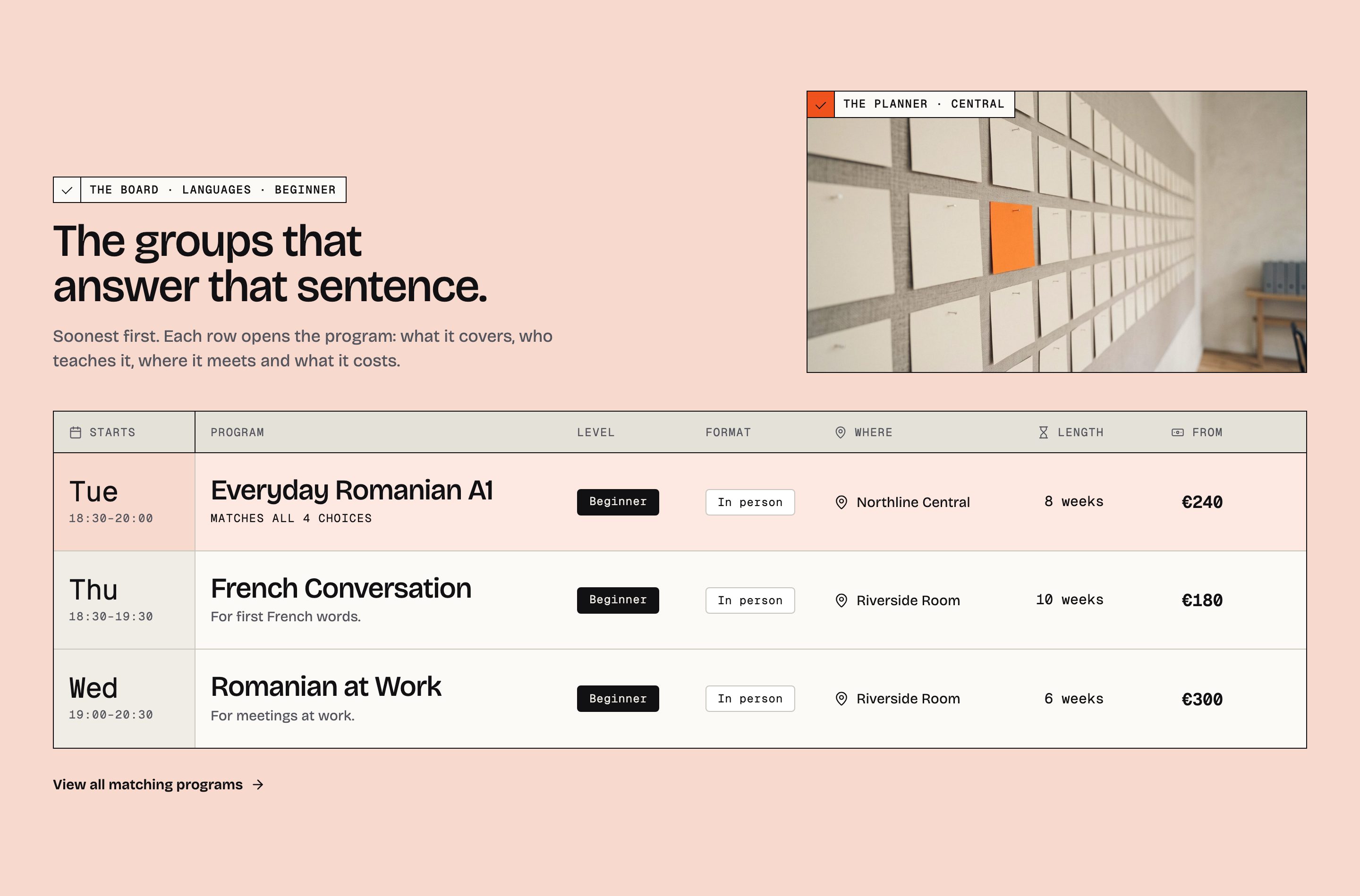
The Studio first screen: the finder sentence over the evening class, one filled action, the best-fit row pinned on the photograph's lower edge
Program finder hero, by day
The Training first screen: the Saturday workshop
Program finder hero, admissions
The College first screen: the street at blue hour, places as choices, How to apply, the next deadline pinned
Title banner
An inner page's banner: the page's featured image under an ink wash (or the ink band), breadcrumb, title and excerpt
The finder and the boards
Pattern
What it is
The board, on the match tint
The departure board answering a sentence, with a photograph beside its head
The board, by department
Every program under its department and head
The board, by award
Programs grouped by award
Program directory
The whole catalogue under the finder, with the compare tray
The instructors page and the parts of an instructor's page
Talk to the tutor first
Meeting a tutor before registering, beside a photograph
Places and the school
Pattern
What it is
Four departments
The departments as photograph slots beside their counts and next starts
Four departments and their heads
Each department with the person who answers for it
Department index
The departments as tiles
Two places
The two sites: a large photograph, the addresses, access and directions
Two sites, side by side
The sites as two photograph cards
Campus band
A full-width campus photograph with the site cards over its lower edge
The sites
The campus directory, each site with two photographs
The rooms, one by one
The rooms on the match tint
A week at Northline
The campus-life mosaic, morning to the last class
The week by day, The week by evening
The day and the evening of the school in photographs
The opening hours, drawn
The week's hours as bars, from Site details
Visit strip
The door, the address and the hours, closing a page
Contact record
The address, telephone, email and hours
What the school holds, counted
Programs, tutors, departments and sites, counted from the records
The approach, in three principles
Three principles, each beside its photograph
Admissions and enquiries
Pattern
What it is
The next three deadlines
Three deadline rows on the match tint
The deadline ledger
Every reviewed deadline with its state
How to apply
Four numbered steps beside a photograph
The route to a place
The steps as a line of stops
The first conversation, Two ways to have the conversation, Who does what
The consultation page's sections
Bring a group, What a closed group keeps, The team enquiry
The team sections
Send an enquiry
The enquiry panel that holds the contact form
Consultation prompt, Ask a tutor
A route to a person
Questions
Pattern
What it is
Before you book
A prose column beside four questions
Ten questions, in two groups
The Questions page body
Questions teams ask
Six answers in a two-column grid
Question rows, before you register / before the first conversation / about the dates
Three questions that close a page
Education FAQ index
A plain list of questions
Grounds and editorial
Pattern
What it is
Night band, the evening groups / the after-work groups / the evening class and the hours / how a deadline is read
The full-width photograph under ink
Signal band, the consultation / the team enquiry / request information
The orange band, one per home, on a decision
On the table
Five detail photographs of unequal width, with one-line captions
From the resources, From the resources as a ledger, Resources by subject, Learning resource index
Posts as slots, as a ledger, or by subject
Header and footer
Pattern
What it is
Lumina Edu header
The 80 px bar: wordmark, six menu items, telephone, search, Book a consultation
Lumina Edu footer
Six photographs, four columns, the wordmark and the ribbon
Not in the inserter
Testimonial pair leaves the inserter in 1.2.0. It stays registered for this release so a page
that uses it keeps working, and is removed in 1.3.0: a pattern that ships two made-up quotes is
invented proof. Replace it on your pages before you update to 1.3.0.
Lumina Edu token sheet and the Style guide page are reference sheets of the design, not
sections.
The program, instructor and department page patterns, the post parts, the search and
404 parts and a few compatibility aliases are used by templates, not inserted by hand.
With the plugin on, and with it off
A theme-only site must look close to the demo, and Lumina Edu does, by design. Every section that
states a record is written as the plugin's block around a still example. With Lumina Edu Core
active the block prints your records and the example is not shown. With it inactive, WordPress prints
the still example saved inside the block.
Section
With Lumina Edu Core
Without it
The finder and the boards
Your programs, answering the sentence; dates, levels, formats, places, lengths and prices from the records
The sentence as words; a few rows of the example school under a day and an hour
Next starts, the cohort calendar, the week, the night band's groups, the session ledger
Your dated groups; each leaves the page when its day passes
The example school's groups under a day and an hour
Programs with a picture, the planner, six programs for work
Your pictured programs, railed with their next group
Six stand-in slots railed Tue · 18:30 · Central, no date
The tutors, the faculty, the directory
Your instructors, railed with a session they teach
The example school's six
Departments, campuses, the sites
Your records, with counts and next starts
The example school's four departments and two sites, with a schedule (meets Mon–Thu) for a date
Deadlines
Your reviewed deadlines; a row leaves when it closes
Rows under a weekday and "the week before", "Reviewed by admissions"
Questions
Site details and your programs' FAQ
The example school's questions, word for word
Opening hours, the contact record, the header's telephone
Site details
The example school's hours, address and telephone
Counts in rails and banners (programs, tutors, departments, sites)
Counted from your records
The example school's figures
What a program costs
Your lowest and highest published price
The example school's two fees
Compare
Your featured programs, or those you ticked
Three example programs on a still board
A still example names days and hours (Tue · 18:30–20:00, "Tuesdays", "Mon–Thu"), never a date: it
cannot know the day it is read on, so it never claims one. Headings, ledes, photographs and actions
are the same words on both sides.
Pages that exist only because of a record — a program's, an instructor's, a department's or a
campus's own page — are gone while the plugin is off; see Deactivating and
exporting. The demo's Programs page keeps the whole Northline catalogue as its
still version, so it reads as a timetable even then.