The finder, the board and compare
Three pieces carry every home and the Programs page, and they are the reason the theme exists: the finder asks one sentence, the departure board answers it, and compare puts up to three programs side by side. They read the same six facts in the same order everywhere — next date, level, format, place, length and price — so a visitor never has to translate between one view and the next.
All three belong to Lumina Edu Core. With the plugin off, each shows a still example (see With the plugin off).
The finder: one sentence
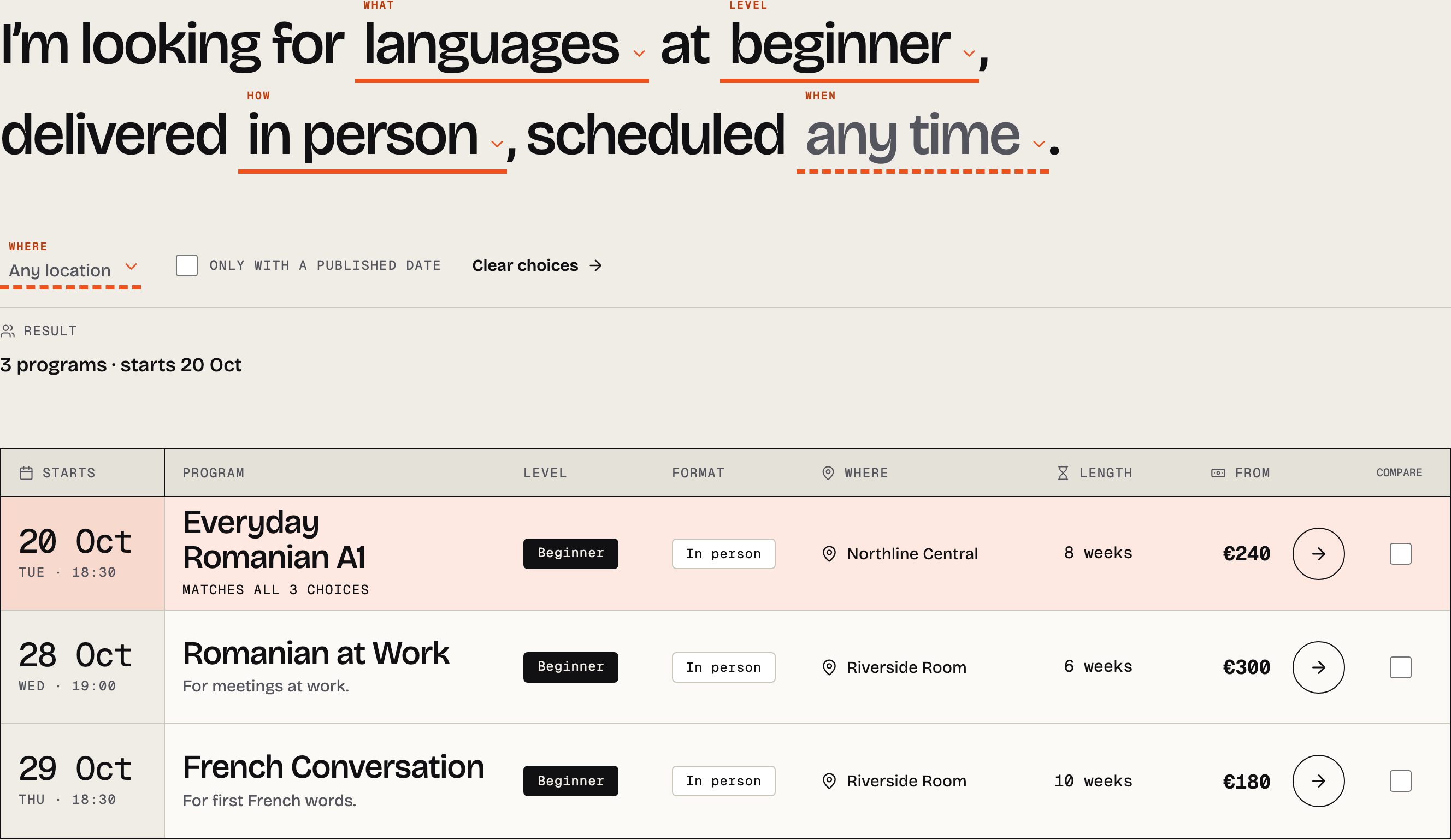
The finder is a sentence with four blanks, and each blank is a real choice:
I'm looking for languages at beginner, delivered in person, scheduled weekday evening.
- What is a Subject, Level a Level, How a Format and When a Schedule band — the terms you assign to each program under Programs → Program terms. Add a term and it becomes a choice.
- It is an ordinary form. Choosing answers produces a plain address such as
/programs/?subject=languages&level=beginner&format=in-person, which you can link to, bookmark or share, and which works with no JavaScript at all. With JavaScript the board updates in place and a short status line says how many programs answer. - The sentence prints terms in lower case. A term that is a proper noun (English, IELTS) keeps its capitals when you tick Keep capitals in the program finder sentence on the term.
Over the hero photograph
On each home the sentence is the page's heading, set over the hero photograph, with one filled action that counts the answer (View 3 matching programs). The best-fit row — the first program that answers, under its next date — is pinned over the photograph's lower edge, so the first screen holds both the question and its answer. Each home opens the sentence on its own words:
| Home | Opens on | The pinned row |
|---|---|---|
| Studio | languages · beginner · in person · weekday evening | The best-fit program and its next start |
| Training | communication · intermediate | The best-fit program and its next start |
| College | languages · beginner · in person, with the places (Northline Central, Riverside Room, Online) as choices under the sentence | The next registration deadline; the filled action is How to apply |
The words a hero opens on are attributes of its block. Select the finder in the editor to change them, or insert one of the three hero patterns (Program finder hero, …, by day, …, admissions) and set your own.
When nothing matches
A sentence no program answers says so in words, offers Clear choices and names the consultation page as the next step. It never shows an empty board without saying why.
The departure board
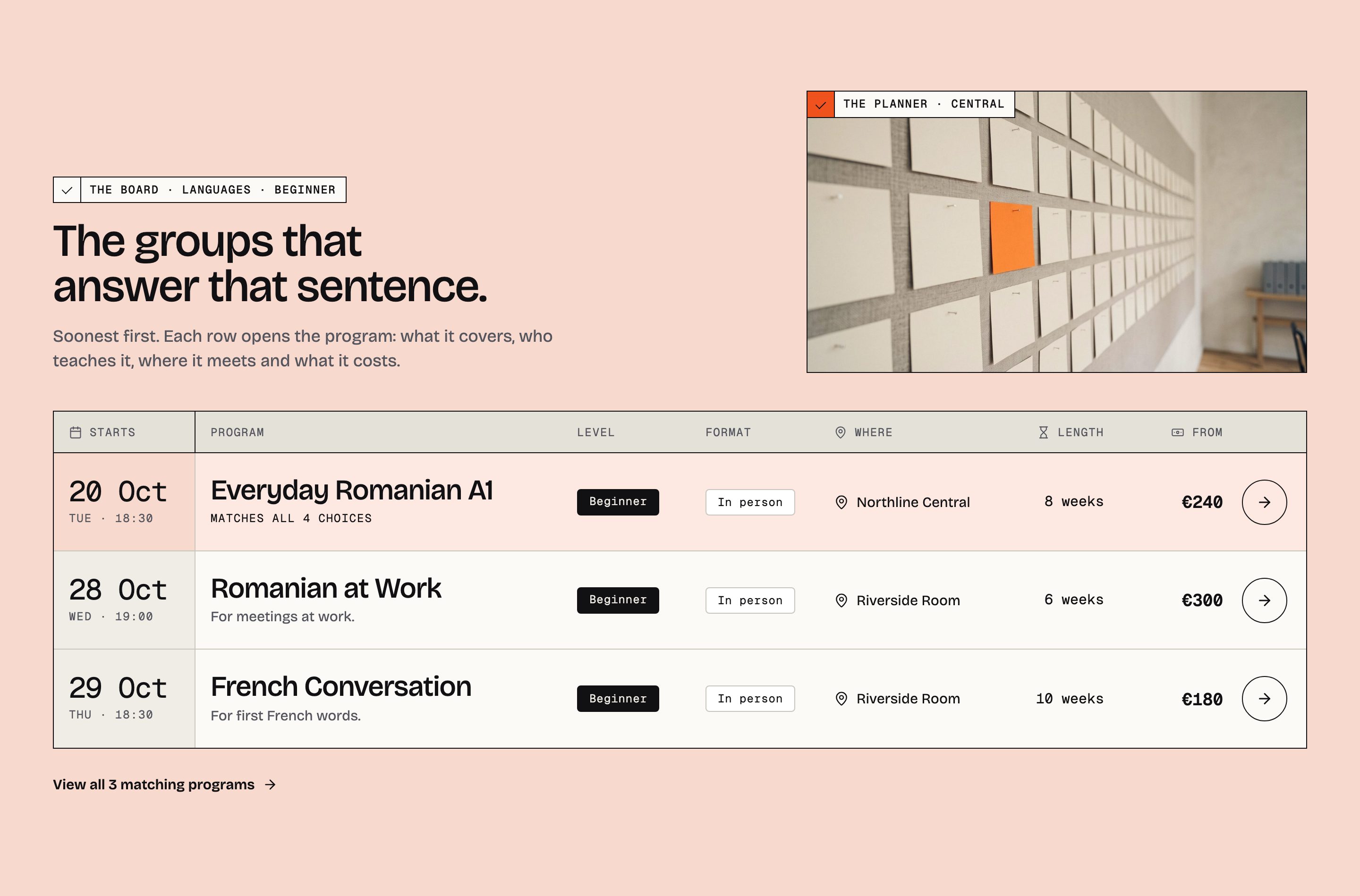
The board is a timetable, not a card grid: one ruled row per program with its next start, level, format, place, length and price, soonest first. The best fit is marked in Signal. It stays type-only on purpose; the photograph stands beside its head, never inside a row.
Where it appears, and how it is cut:
| Section | Where | What it shows |
|---|---|---|
| The board, on the match tint | Studio home | The programs that answer the hero's sentence; change a word of the sentence and the rows, the mark and the link follow |
| The board, by department | Training home | Every program of the chosen departments, each group under its department and head |
| The board, by award | College home | The programs grouped by award |
| Program directory | Programs page | The whole catalogue under the finder, with the compare tray |
| The finder board | How to apply | The board a first registration starts from |
A row's date is the program's next open session with a start date from today on. The day it passes, the row moves on to the next session or leaves the board — in the visitor's browser too, so a cached page does not keep yesterday's date. A program with no dated session shows No session date published and offers the consultation route when one exists; Lumina Edu never invents a date.
Featured programs (Program facts → Feature this program in curated lists) lead the curated boards and are the default comparison.
Compare
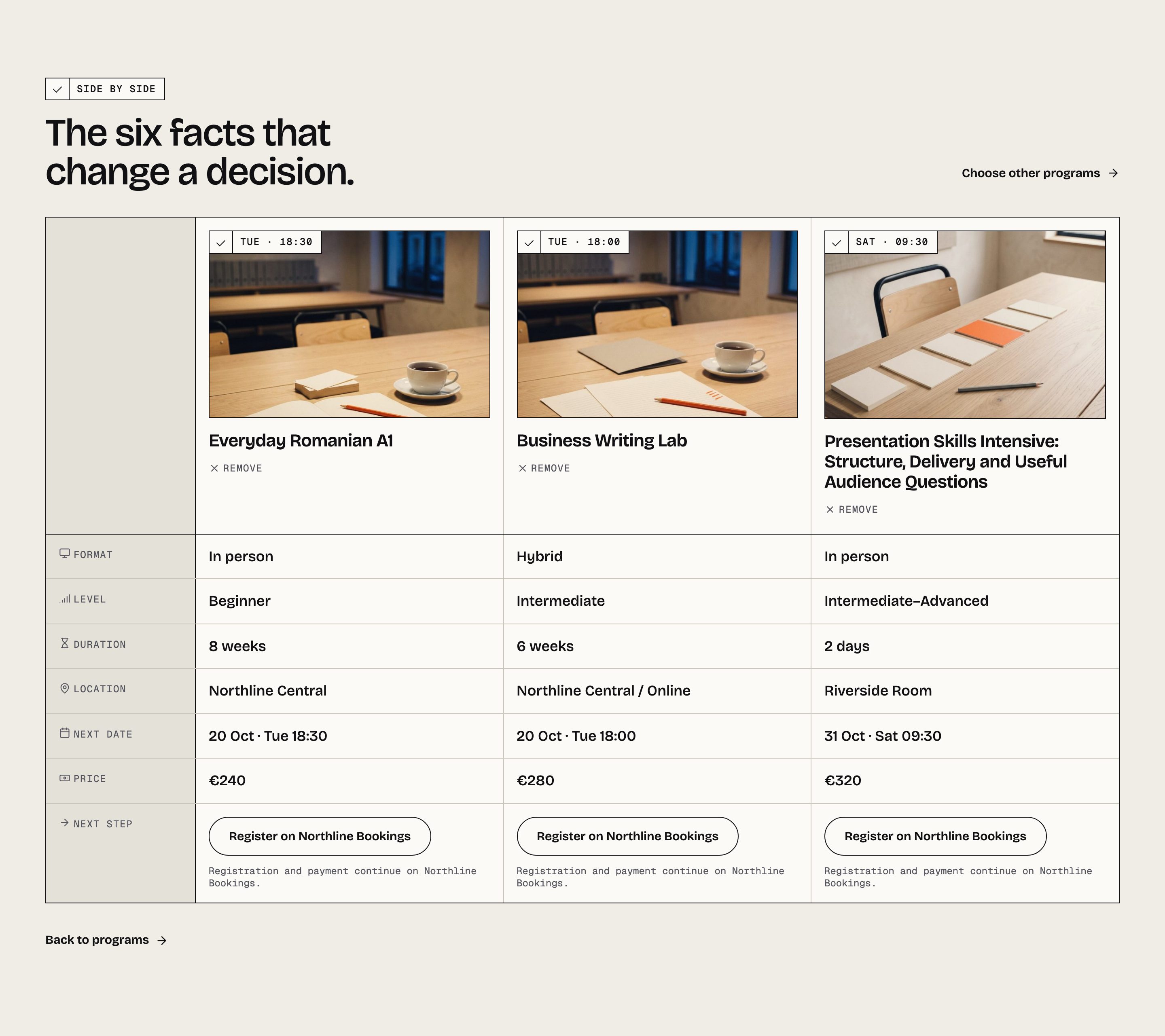
Every board row on the Programs page has a Compare tick. Tick up to three, press Compare, and
the visitor lands on /compare-programs/ with those programs side by side: format, level, length,
place, next date and price, each program's photograph in a slot above its column. The address carries
the choice (?compare=…), so a comparison can be shared. Nothing is stored in a cookie and no
account is needed.
With nothing chosen, Compare shows the featured programs side by side — or, when none is featured, the next three to start — so the page is a real comparison the moment it opens, never an instruction on an empty page.
With the plugin off
The finder, the board and compare are the plugin's blocks. With Lumina Edu Core inactive, each shows the still example the theme saved inside it:
- the hero's sentence as words, one filled action and one still row under a day and an hour
(
Tue · 18:30), never a date; - the board as a few still rows of the example school, under day and hours;
- the compare page as three example programs on a still board.
Nothing is broken and nothing claims a date, but nothing answers either. The demo's Programs page saves the whole Northline catalogue as its still version, so it reads as a timetable even then.