Where everything comes from
Every band of the home page, what a visitor sees in it, what fills it, and the screen you edit that on. Then the card, part by part. Nothing here changes anything: it is a map.
Every band carries its name in the editor's List View, spelled as it is spelled here, so the thing you read about is the thing you click. A shorter map, with every screen name as a link that opens it, is inside your site at Settings › Site details › Guide.
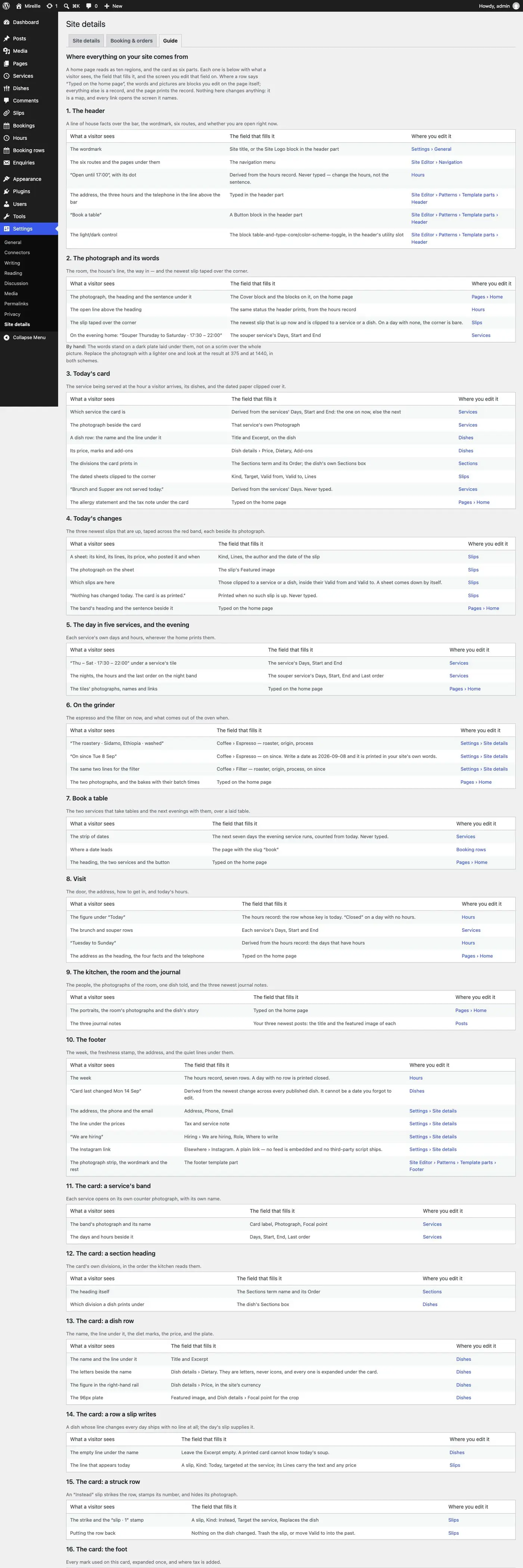
What is static and what comes from the plugin
The theme draws every page on its own. Table and Type Core adds the records (dishes, services, hours, slips, booking rows, site facts) and, with it active, the bands that state a fact about today stop being typed text and read those records instead.
What reads your records, on the three homes
| Band | With Table and Type Core active | Record, and where you edit it |
|---|---|---|
| The hero's slip | The newest live slip that is clipped to a service or a dish. When there is none the slip is simply absent: no empty card. | Slips |
| The hero's open line | "Open until 17:00", "Closed · opens at 07:30". It is the same open-status block the header carries. | Hours |
| Today's changes | Up to the three newest live slips clipped to a service or a dish, each taped up with its own photograph. One quiet sentence when nothing has changed today. | Slips; the photograph is the slip's Featured image |
| The served card | The card for the service being served: its name, days and hours, its dishes by section, the day's slips in its lane, and any row a slip strikes. | Services, Dishes, Sections, Slips |
| The photograph beside the served card | That service's own photograph. | Services › the service › Featured image |
| "… not served today" | The services that do not run today, named in one sentence. Nothing is printed on a day when every service runs. | Services › Days |
| The visit band's hours for today | Today's row of the week. | Hours |
| Each service's days and hours | The line under each of the five service tiles, the night band's rows, the night strip, the souper card's eyebrow, and the service rows in the visit band. | Services › Days, Start, End |
| The open-days line | Which days the door opens, built from the week. | Hours |
| The book band's day strip | The next seven days the evening service runs, each a link to the booking page. | Services › Days |
| The two coffees in On the grinder | Each coffee's roaster, origin and process, and the date it went on the grinder, printed in your site's own words. | Settings › Site details › Coffee |
| The header and the footer | The open status, the week, the address and contact lines, the "card last changed" stamp, the tax note, the light/dark control. | Hours, Dishes, Settings › Site details |
A slip can carry a photograph: set its Featured image. It is what Today's changes tapes up beside the slip's line.
What the same bands show with the plugin off
The theme's own typed stand-ins: a slip, a card, an hours figure, a line of times, written into the pattern as ordinary blocks. They carry no weekday and no calendar date, so a site without the plugin is never wrong about the calendar; it says "Today" and a pair of times, and you type what is true for your house. The stand-in is what a plugin-free site publishes, and it is what you edit by hand if you never install the plugin.
What is static either way
These are theme sections made of ordinary blocks. The plugin does not touch them; you edit them in the page, in the Site Editor.
| Section | On |
|---|---|
| Every band's heading, lede and photographs | All pages |
| A dish, told (and the bake and souper-dish versions) | The three homes |
| The kitchen, three people | The three homes; the kitchen page |
| The room, morning to night | The three homes |
| The counter this morning, the bakes board | The bakery home |
| The goûter band | The bakery home |
| Le souper, the evening card, with its taped slip and struck row | The bistro home. It is a showcase of the evening card as printed; the live souper card is on /menu/. |
| The carafe list | The bistro home |
| The bakes with their batch times, and the two photographs, in On the grinder | The all-day and bakery homes |
| The address heading, the transit, access, laptop and dog facts in the visit band | The three homes |
| About, the kitchen page, questions, contact, groups | Their own pages |
| Title banners, including the small slip on a banner (the card's is the day's slip when the plugin is active) | Every inner page |
A service's schedule is never retyped on an inner page. Where an inner page prints a
service's days and hours as a line of its own — the two stamps and the three walk-in rows on
/book/, the evening room's stamp on /about/, the hours beside each service in the laptop
rules on /visit/, the nights and the last order in "After dark" on /visit/ and /contact/ —
the line is bound to that service's record, exactly as the tiles on the
homes are: change Services › Days, Start, End or Last order and those lines follow. With
the plugin off they print the schedule as typed in the pattern. A sentence that mentions an hour
in passing ("the globes go on at half past five") is yours, typed, and stays as you wrote it.
The day room's hours are the door's. The day room's stamp on /about/ prints the hours your
door keeps on most days of the week, from Hours (07:30 – 17:00 on the demo, Tuesday and
Wednesday; a tie goes to the earlier day). Change a weekday's row and the stamp follows; with the
plugin off it prints the hours typed in the pattern. Any paragraph can do the same: it is the
hours binding's door_range field, with day set to usual (the default), week (the earliest
opening to the latest closing) or one weekday's key, such as tue. There is no "today": a bound
line is not worked out again on a cached page, so it never claims a date.
On the inner pages the plugin's own blocks are the content: the card on /menu/, the drinks list
on /drinks/, the week, the address and the arrival facts on /visit/, the policy rows, the
booking flow and the enquiry form on /book/, the privacy record on /notices/. With the plugin
off the theme draws a static twin of each; see
with the plugin switched off.
A cached page stays true
A page built once and served to everybody cannot claim an hour. So the server prints each live band in its clock-free state (today's candidate slips, the day's schedule, the week) together with the windows and the schedule themselves, and a small script in the page re-derives the hour from them in your site's timezone: which service is being served, which slips are still up, whether the door is open. It is the same mechanism the menu card and the header's open line have always used. A visitor with no JavaScript gets the clock-free state, which is a real answer rather than a blank. See how a cached page still knows.
The all-day home, band by band
The bakery and bistro homes reorder these bands and add a few of their own; The three homes has the order for each.
1. The header
| What a visitor sees | What fills it | Where you edit it |
|---|---|---|
| "Open until 17:00", with its dot | Derived from the hours record. Never typed: change the hours, not the sentence. | Hours |
| The street, the telephone | Typed in the header part | Site Editor › Patterns › Template parts › Header |
| The three homes | Three links typed in the header part | The same |
| The wordmark | Site title, or the Site Logo block | Settings › General |
| The six routes and their dropdowns | The navigation menu | Site Editor › Navigation |
| The light/dark control | The plugin's block, in the header's utility slot | Header part |
| The bordered Book a table | A Button block | Header part |
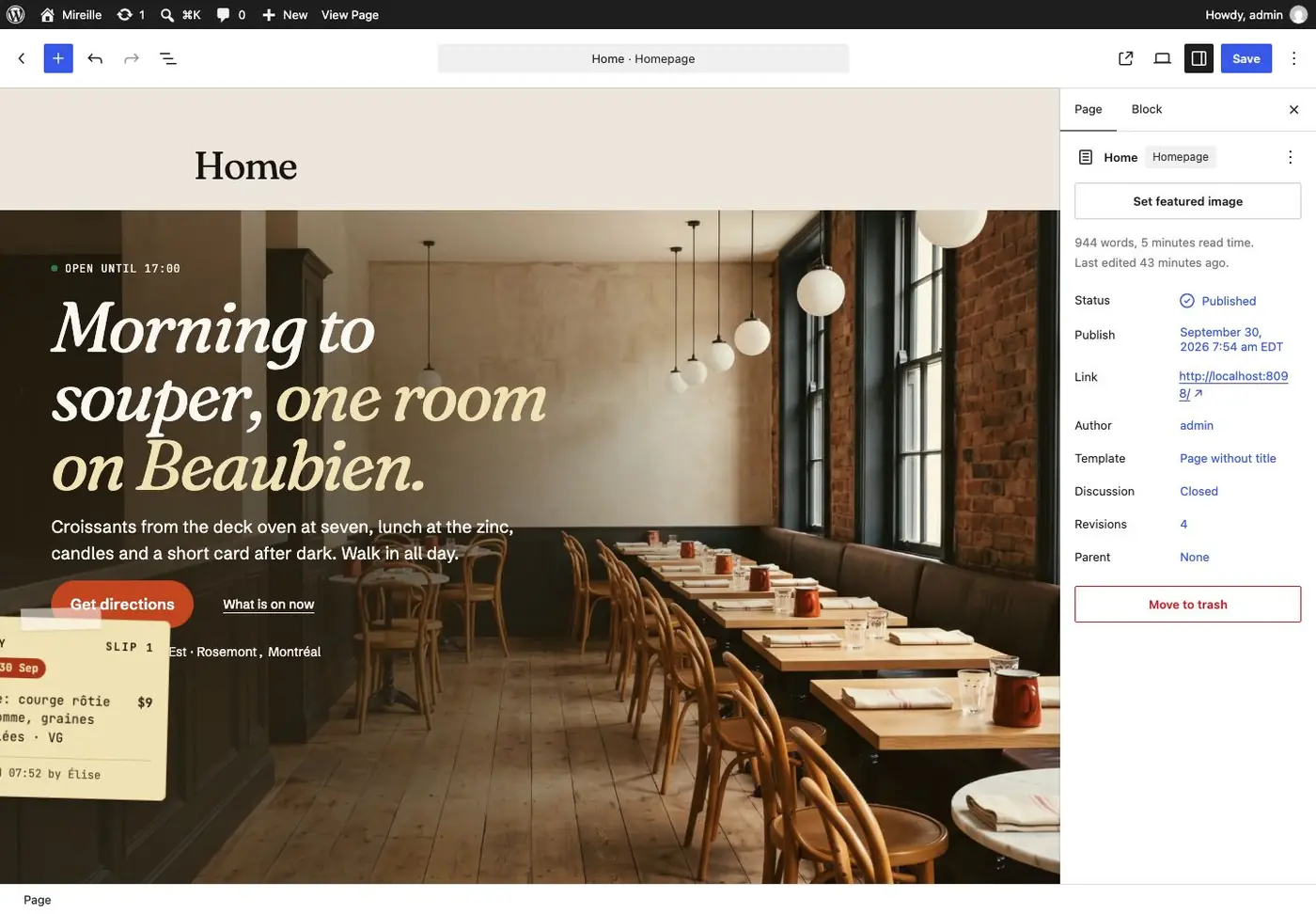
2. The hero
| What a visitor sees | What fills it | Where you edit it |
|---|---|---|
| The room photograph | The Cover block's image and focal point | Pages › Home |
| The open line | The open-status block | Hours |
| The heading, the lede, the street line | Typed | Pages › Home |
| Get directions | A Button block; it leads to the visit page, whose directions link is built from your coordinates | Pages › Home; Settings › Site details |
| The slip taped over the corner | The newest live slip clipped to a service or a dish | Slips |
By hand: the words stand on the dark side of the photograph, with an ink ground laid under them. Replace the photograph with a lighter one, or move its focal point, and look at the result at 390 and at 1440 before you publish.
3. The served card
| What a visitor sees | What fills it | Where you edit it |
|---|---|---|
| The band's heading and helper | Typed | Pages › Home |
| The photograph beside the card | The served service's Featured image | Services |
| The service's name, days and hours on the card | Card label, Days, Start, End | Services |
| The card's marker: "Served now" when it is, a quieter line when it is earlier, later or not today | Derived from the services. The page's script picks it from the hour. | Services |
| A dish row: name, line, marks, price | Title, Excerpt, Dish details | Dishes |
| The divisions the card prints in | The Sections term and its Order | Sections |
| The dated sheets clipped to the corner, and the struck row | Kind, Clipped to, Showing from, Until, Lines | Slips |
| "… not served today" | Derived from the services' days | Services |
| The allergy statement and the tax note under the card | Typed | Pages › Home |
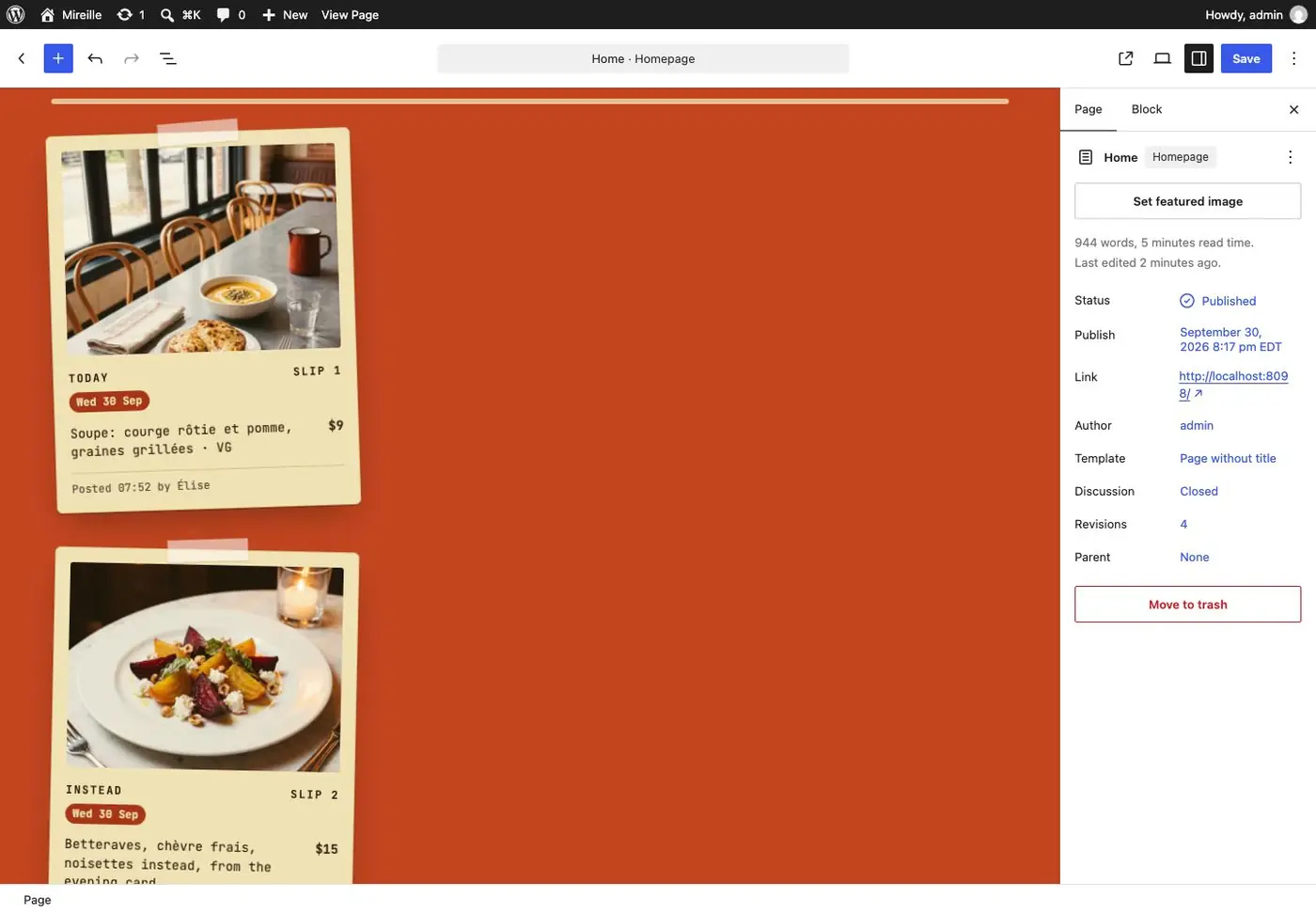
4. Today's changes
| What a visitor sees | What fills it | Where you edit it |
|---|---|---|
| The band's heading and helper, on the red | Typed | Pages › Home |
| The photograph of the tape and slips beside the heading | Typed (an Image block in the pattern) | Pages › Home |
| Up to three slips hanging from the pass's rail | The three newest live slips clipped to a service or a dish; the rail keeps its three places when fewer are up | Slips |
| The photograph on each | The slip's Featured image | Slips › the slip › Featured image |
| One quiet sentence instead of slips | Printed when no slip is live | Nothing to edit: post a slip |
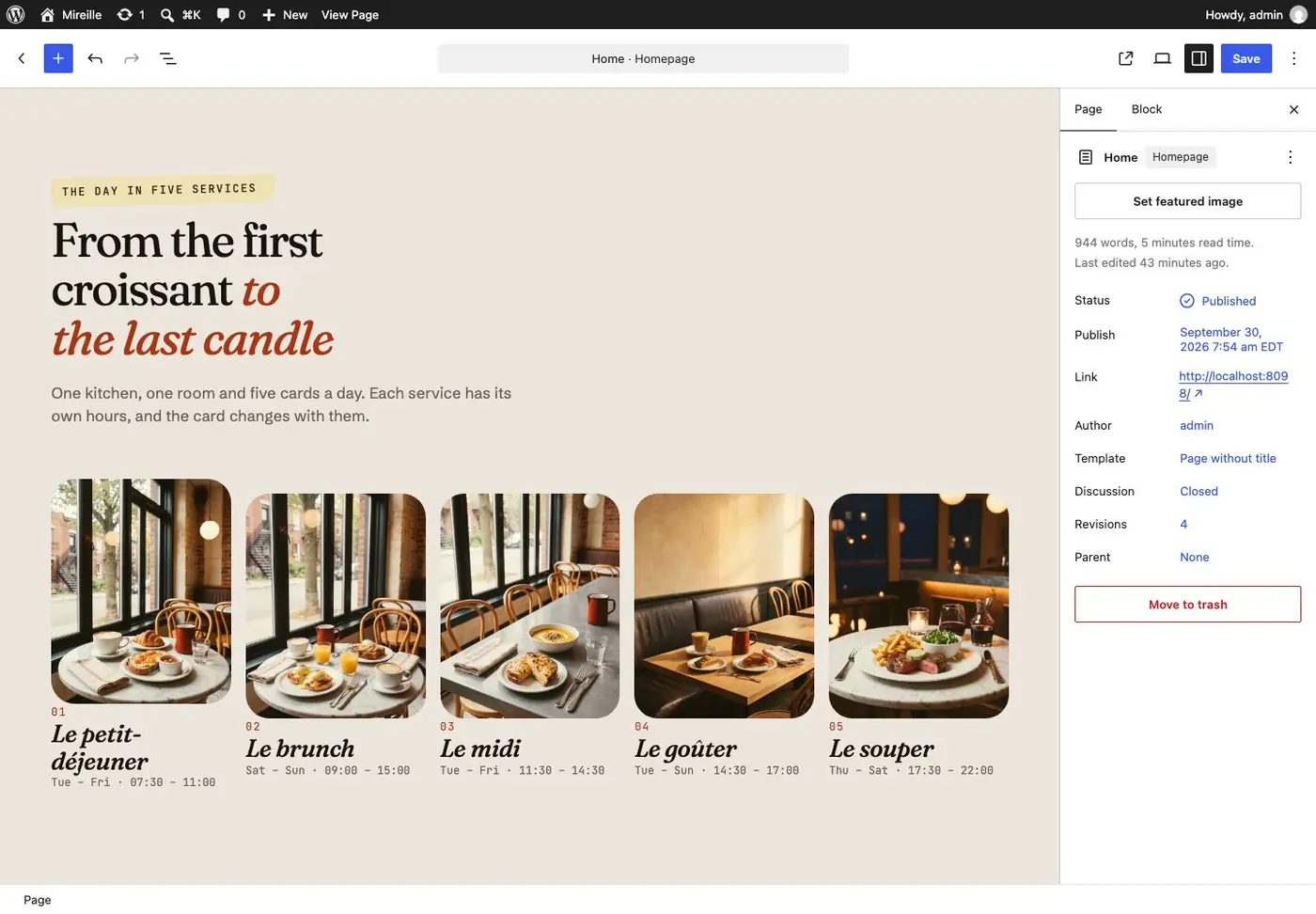
5. The day in five services
| What a visitor sees | What fills it | Where you edit it |
|---|---|---|
| Five photographs, each with a service's name | Image and Paragraph blocks; each tile links to that service on the card | Pages › Home |
| The days and hours under each | Days, Start, End | Services |
6. A dish, told
Static. The photograph, the story, the price and the marks are typed on the page. Rewrite it for a dish of your own.
7. On the grinder
| What a visitor sees | What fills it | Where you edit it |
|---|---|---|
| The two photographs | Image blocks | Pages › Home |
| "Espresso · the roastery · Sidamo, Ethiopia · washed" | Typed | Pages › Home |
| "On since …" | Coffee › Espresso (or Filter), on since. Write a date as 2026-09-08 and it is printed in your site's own words. |
Settings › Site details |
| The bakes, their batch times, "usually gone by 11:00" | Typed. It is what the room says from experience, never a stock count. | Pages › Home |
8. The night band
| What a visitor sees | What fills it | Where you edit it |
|---|---|---|
| The room at night, the heading, the lede | Image, Heading and Paragraph blocks | Pages › Home |
| The evening service's days and hours | Days, Start, End | Services |
| The booking action | A Button block | Pages › Home |
9. The kitchen · 11. The room
Static. Three portraits with names and roles; a mosaic of the room from morning to night. Both are Image and Paragraph blocks on the page.
10. Book a table
| What a visitor sees | What fills it | Where you edit it |
|---|---|---|
| The laid table, the heading, the two services that take tables | Cover, Heading and Paragraph blocks | Pages › Home |
| The strip of seven days | The next seven days the evening service runs | Services › Days |
| Choose a time | A Button block to the booking page | Pages › Home |
Nothing in this band claims a table is free, because nothing in it knows. The booking page does the booking; see Booking, orders and enquiries.
12. Visit
| What a visitor sees | What fills it | Where you edit it |
|---|---|---|
| The door photograph, the address as the heading, the four facts, the telephone | Typed | Pages › Home |
| Today's hours, large | Today's row of the week | Hours |
| The rows under it: each bookable service with its days and hours, and the open days | Services; the week | Services; Hours |
| Get directions | A Button block to the visit page | Pages › Home |
13. From the journal
The three newest posts, each with its featured image, category and title. WordPress's own Query Loop; it needs no plugin. Posts.
14. The footer
| What a visitor sees | What fills it | Where you edit it |
|---|---|---|
| The strip of six photographs | Image blocks in the footer part | Site Editor › Patterns › Template parts › Footer |
| The week | The hours record, seven rows. A day with no row is printed closed. | Hours |
| The address, the phone and the email | Address, Phone, Email | Settings › Site details |
| The house links | Typed links | Footer part |
| The Instagram link, "We are hiring" | Elsewhere › Instagram; Hiring. A plain link: no feed is embedded. | Settings › Site details |
| The name set large | The Site Title block | Settings › General |
| "Card last changed Mon 14 Sep" | Derived from the newest change across every published dish. It cannot be a date you forgot to edit. | Dishes |
| The tax note | Tax and service note | Settings › Site details |
The card, part by part
The card page, /menu/.
The index
Five services numbered, each with its days, its hours, how many dishes and what they cost, over the allergy statement, the tax note and the dietary filter. All of it is derived from Services, Dishes and Settings › Site details.
Four plates from the pass
Four dishes photographed large before the card begins. They are the dishes you ticked Featured, in the order of the service each is first served at. See Photographs.
A service's band
| What a visitor sees | What fills it | Where you edit it |
|---|---|---|
| The band's name | Card label | Services |
| The days and hours beside it, the last order | Days, Start, End, Last order | Services |
| The photograph over each section | The section's Photograph | Dishes › Sections › the section |
A section heading
| What a visitor sees | What fills it | Where you edit it |
|---|---|---|
| The heading itself | The Sections term name and its Order | Sections |
| Which division a dish prints under | The dish's Sections box | Dishes |
A dish row
| What a visitor sees | What fills it | Where you edit it |
|---|---|---|
| The name and the line under it | Title and Excerpt | Dishes |
| The letters beside the name | Dish details › Dietary. They are letters, never icons, and every one is expanded under the card. | Dishes |
| The figure in the right-hand rail | Dish details › Price, in the site's currency | Dishes |
| The small plate on the row | Featured image, and Dish details › Focal point for the crop | Dishes |
A row a slip writes
A dish whose line changes every day ships with no line at all; the day's slip supplies it.
| What a visitor sees | What fills it | Where you edit it |
|---|---|---|
| The empty line under the name | Leave the Excerpt empty. A printed card cannot know today's soup. | Dishes |
| The line that appears today | A slip, Kind: Today, clipped to the service; its Lines carry the text and any price | Slips |
A struck row
An Instead slip strikes the row, stamps its number, and hides its photograph.
| What a visitor sees | What fills it | Where you edit it |
|---|---|---|
| The strike and the "slip · 1" stamp | A slip, Kind: Instead, clipped to the service, replacing the dish | Slips |
| Putting the row back | Nothing on the dish changed. Move Until into the past, or trash the slip. | Slips |
The struck row keeps its name and its place, because a reader has to see what was taken away. It takes a 2px strike, carries a stamped mark and the word beside it (never colour alone), and loses its thumbnail, because a photograph of a dish you cannot have is a lie.
The foot
| What a visitor sees | What fills it | Where you edit it |
|---|---|---|
| The key of letters | Built from the rows the card printed. It lists only the marks in use. | Dishes |
| The allergy sentence | House rules › Allergens | Settings › Site details |
| The tax line | Tax and service note | Settings › Site details |