Content types and fields
Seven kinds of record, all of them owned by the companion plugin. They are data the theme renders, not pages to crawl: none of them has a public archive or a single-post URL, and none of them is indexed by a search engine on its own. The journal is WordPress's own posts, with one field added.
Every field is exposed over the REST API with a schema, a sanitiser and a capability check, which is what makes the agent abilities and a multilingual plugin both work.
Dishes — tat_menu_item
The rows of the card. The demo has 52: nine with a row thumbnail, four more set large as featured plates, the rest type only, on purpose.
| Field | Type | Required | Notes |
|---|---|---|---|
| Title | text | yes | The dish's name, as the card prints it. |
| Excerpt | text | no | The line under the name. Leave it empty when a slip supplies it daily. |
| Featured image | media | no | The small plate on the row. |
| Featured | yes / no | no | Sets the dish large in the band of four plates on the card page. |
| Plate photograph | media | no | The square photograph that band prints. Not the row thumbnail: a dish set large can leave its row without one. |
| Price | int, cents (stored and over REST); the Dish details panel takes the site's currency, 14 or 4.25 |
yes | 1400 prints as $14; 425 as $4.25. |
| Dietary | V VG GF DF N |
no | Letters, never icons. N means contains nuts — an allergen, never a diet, never a filter button. |
| Dayparts | list of service slugs | yes | Which services this dish is served at. |
| Sections | taxonomy term | yes | The division it prints under. |
| Add-ons | list of {label, price} |
no | What can be added, and for how much. |
| Focal point | {x, y} 0–1 |
no | The point the thumbnail's crop keeps. |
| Name language | BCP 47 tag | no | Defaults from the site fact. See Translation. |
| Availability | on / off |
no | off takes the dish off every card without deleting it. |
| Order | int | no | Where it falls inside its section. |
The admin list can be filtered by service and by section, and carries price, marks and services as columns.
Sections — tat_menu_section
The divisions the card is printed in: Viennoiseries, Plats, Desserts du soir. A taxonomy, so a dish can be in more than one. The demo has twelve.
| Field | Notes |
|---|---|
| Name | The heading on the card. |
| Order | Where the division falls. |
| Note | An optional line under the heading. |
| Photograph | The picture the section opens on, on the full card. Set it on the section's own screen. |
| Kind | food or drinks. A drinks section is left out of the service bands and printed once at the end of the card — nine drinks served at five services is nine rows, not forty-five. |
Services — tat_daypart
The times of day the kitchen serves. The demo has five: Petit-déjeuner, Brunch, Midi, Goûter, Souper.
| Field | Required | Notes |
|---|---|---|
| Label | yes | The name used in the site chrome: Lunch. |
| Card label | yes | The name as printed on the card: Le midi. |
| Days | yes | Which weekdays it runs, Monday to Sunday. |
| Start / End | yes | HH:MM, 24-hour. |
| Last order | no | HH:MM, printed on the card's foot. |
| Bookable | yes | Whether this service takes a table. |
| Laptops | no | Whether laptops are welcome during it. |
| Position | yes | Where the service falls in the day. |
| Featured image + focal point | no | The service's photograph: beside the served card on the home page when this service is the one being served. |
Everything derived on the site is read from this record and never typed: the "served now" marker, the days-and-hours line under every service, the "not served today" sentence, the day strip in the booking band, the laptop rule, which services show a booking action.
Hours rows — tat_hours_row
| Field | Required | Notes |
|---|---|---|
| Row key | yes | mon … sun, terrace, or a key of your own — a kitchen, a bakery counter. These are the keys an Hours slip may name. |
| Value | no | What the row says. Empty means closed. |
| Order | yes | Where it sits in the record. |
The seven weekday rows are created once, with your site's own weekday names, when the plugin is first activated. Delete one and nothing puts it back: you decided something.
A value is parsed by finding the times, not by matching a separator, so 08:00 – 17:00, a plain
hyphen, a non-breaking space and 07:30 – 11:00, 11:30 – 17:00 all read the same. A value that is
not a pair of times — a sentence, a season — makes the header say "See our hours" rather than
guess.
Slips — tat_slip
Covered in full on Slips. Fields: Kind, Clipped to, Dish it replaces, Row it strikes, Showing from, Until, Posted by, Lines, and an optional Featured image, the photograph taped up with the slip in Today's changes. The post date is WordPress's own and prints as "Posted 07:52".
Booking rows — tat_booking_row
One row per service that takes a table.
| Field | Required | Notes |
|---|---|---|
| Service | yes | A bookable service's slug. These are the keys a Booking slip may name. |
| Value | yes | The policy sentence — "Book online, up to 6". |
| Order | no | Where the row sits on the card. |
A service that takes no bookings is refused, and the refusal names the ones that do. With the menu part of the plugin switched off nothing can check it, so any slug is accepted and the notice says the check could not run.
Journal posts, and the byline
The journal is WordPress's own Posts, with their categories, tags and featured images. The
companion plugin adds one field: Byline (tat_byline), a box on the post's editing screen.
| Field | Notes |
|---|---|
| Byline | The name printed under the post. When it is filled, the author name block prints it; when it is empty, the account's display name is printed, as WordPress does. |
It exists because an imported or ghost-written post is saved by whoever pressed the button, and the name under a note should be the person who wrote it. It is a field, not an account: nobody needs a login to be credited. The demo's eight posts are signed by three people this way.
Site facts — Settings › Site details
One record, edited on one screen, holding everything about the business that is not a list.
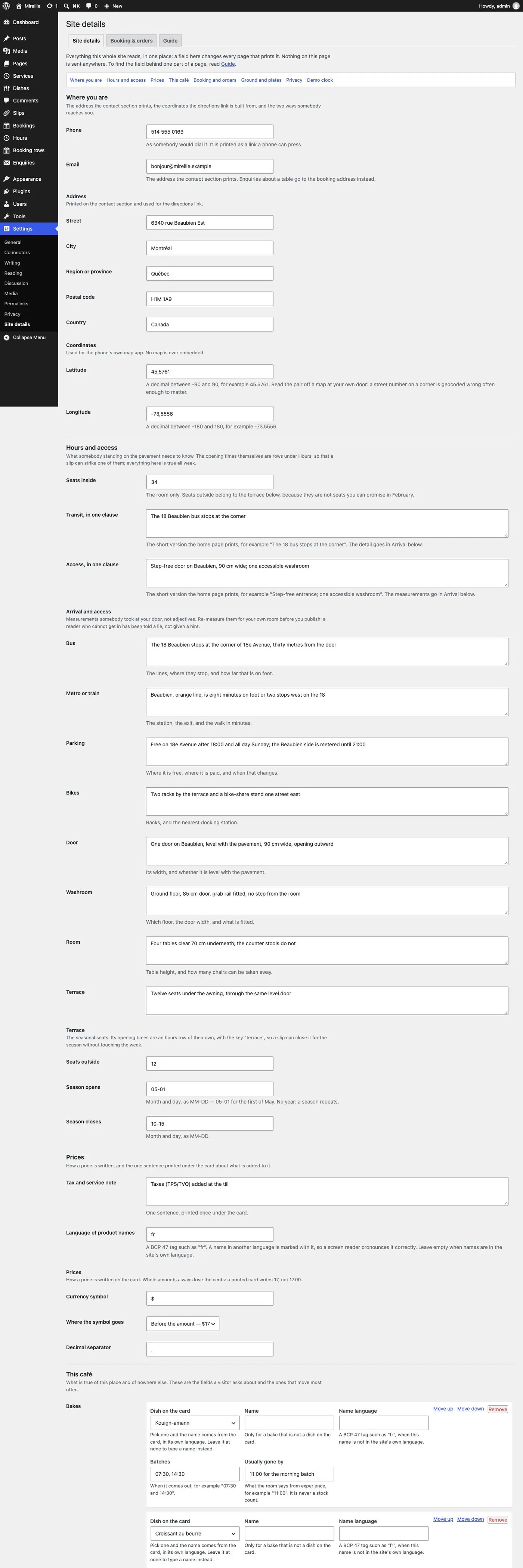
| Group | Fields |
|---|---|
| Address | Street, City, Region, Postal code, Country |
| Coordinates | Latitude, Longitude — what the directions link and the geo: handoff use |
| Contact | Phone, Email |
| The room | Seats; Terrace seats, season start, season end |
| Arrival | Bus, metro, parking, bikes, door, washroom, room, terrace — eight sentences, each a measurement somebody took |
| Transit and access | The one-clause summary each |
| Currency | Symbol, which side it goes, the decimal separator |
| Tax and service note | The line under every price |
| Language of product names | Default BCP 47 tag for dish names — fr in the demo |
| Coffee | Espresso and filter: roaster, origin, process, on since; and the square plate |
| Bakes | Per bake: the item, its batch times, when it is usually gone |
| House rules | Dogs, laptops note, terrace, children, allergens |
| Hiring | Open, role, where to write |
| Elsewhere | Instagram handle — a plain link, no feed, no script |
| Privacy | The responsible person, their role, an address, the retention window in months, the date it was reviewed |
| Booking | Mode, provider, URL, party max, group min, group email, hold minutes, vouchers, keep a copy of enquiries |
| Order | Mode, URL, partner, the collection sentence, the direct sentence |
| Clock | live, or fixture for a demo install that has to photograph the same way twice. Set it back to live before you launch. |
The screen is generated from the record's own schema, so a group of fields arrives as a named section with no admin code behind it — and there is exactly one place to edit any given fact.