Styles, header, footer and patterns
Table and Type is a block theme. Everything visual is edited in Appearance › Editor, the Site Editor, and nothing needs a page builder. There is no options panel and no shortcode.
Global Styles
Appearance › Editor › Styles.
- Colors. Fifty colour tokens: nineteen in the palette you see in the Styles panel and thirty-one the theme uses for its own parts (the slip's paper, field borders, the photograph's ink ground). Every one has a dark counterpart. Four grounds give the pages their rhythm: the cream Background, the Linen of the quieter bands, the Night band, and the red Primary that Today's changes is set on. A colour you invent yourself has no dark value until somebody writes one; see Dark mode.
- Typography. Three self-hosted families ship with the theme:
| Family | Used for | Licence |
|---|---|---|
| Fraunces (upright and italic) | Headings, the card's face, the wordmark; the italic is the accent half of a band's heading | SIL Open Font License 1.1 |
| Schibsted Grotesk (upright and italic) | Body text, navigation, controls | SIL Open Font License 1.1 |
| JetBrains Mono | Prices, times, stamps, eyebrows | SIL Open Font License 1.1 |
All are variable WOFF2 files inside the theme. Nothing is fetched from Google Fonts or any other host, on any page, at any time. To add a family of your own use the Site Editor's own font library; to remove one, change the family assignment in Styles rather than deleting the file.
- Layout. The content measure is 46rem and the wide measure 83rem. Full-width bands run edge to edge; their contents sit on the wide measure inside the page gutter.
- Blocks. Per-block styles, as in any block theme.
Browse styles at the top of the Styles panel switches between the four variations; see Dark mode and the presets.
The logo and the site title
The wordmark is the Site Logo block if you set one, and the site title otherwise. Set the title at Settings › General; set the logo in the header part. The footer sets the site title large across the page. The browser-tab icon is WordPress's own Site Icon; the theme ships none, so the tab shows WordPress's default until you set yours.
The header
Appearance › Editor › Patterns › Template parts › Header.
Two rows on a desktop:
| Row | What it carries |
|---|---|
| The line of house facts | The open status (a slot the plugin fills), the street, the three homes as three links, the telephone |
| The bar | The wordmark, six routes (Menu, Visit, Book, The kitchen, Journal, About) with the inner pages under them as dropdowns, the light/dark control, and a bordered Book a table |
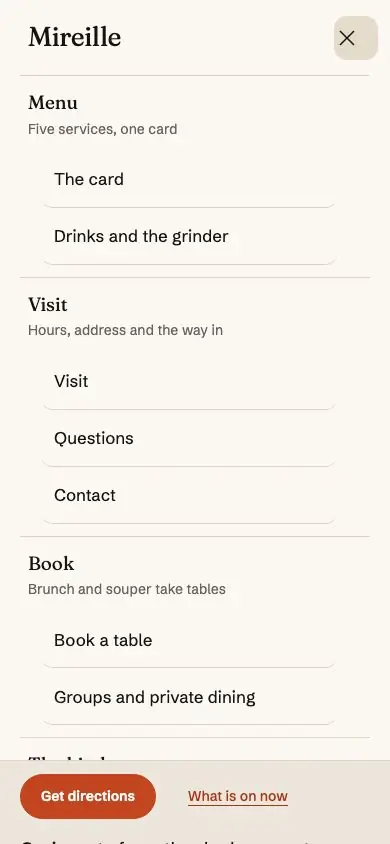
Below desktop width the facts line folds away: the open status and the telephone sit in a row under the bar, the three homes in a row under that on a tablet and at the end of the menu panel on a phone.
- The status dot and its sentence come from the hours record. It is a slot the companion plugin fills; with the plugin off it is simply empty, which is the no-plugin look.
- The header tells you whether the door is open before it asks for anything. That order is deliberate; keep it if you rearrange.
- The street and the telephone are typed in the header part. Change them there.
- Book a table is an ordinary Button block. Point it wherever you like.
- The bar is drawn for six routes. A new page belongs under the route it is part of, as a row of that route's dropdown.
Navigation
Appearance › Editor › Navigation. An ordinary WordPress navigation menu, named Primary by the demo import.
Use a real menu, not the fallback WordPress generates when none exists: the fallback nests one list inside another, which both an accessibility audit and an HTML validator flag. The demo imports a real one, with Journal as a dropdown of the index and its two categories.
The current route is marked with aria-current, so it is announced as well as styled.
The mobile panel
The mobile navigation lives inside the header pattern; there is no separate template part to find. It is the Navigation block's own overlay: full-width rows, the dropdown pages listed under their route, then the three homes and the booking action.
It has no entrance animation, on purpose. A panel that fades in is a panel you are waiting for.
The footer
Appearance › Editor › Patterns › Template parts › Footer.
From the top: a strip of six photographs of the room; four columns (the week's hours, find us, the house, follow); the site's name set large across the page; and a closing rule carrying the freshness stamp, the tax note and the small print.
The week, the address and contact lines, the Instagram and hiring lines, the stamp and the tax note are filled by the plugin from Hours, Dishes and Settings › Site details; with the plugin off each shows the typed line the footer part holds. The photographs and the house links are ordinary blocks.
The visit page's footer drops the week, because the week is already the main thing on that page.
Templates
| Template | Applies to |
|---|---|
index |
The fallback for everything. |
home |
The posts page: the journal's banner and its cards. |
archive |
A category, a tag, a month: the same cards under their own banner. |
single |
A journal post: its photograph as the banner, the text, three more notes. |
page |
A page with its title printed. |
page-no-title |
Page without title: a page that opens on its own hero or title banner. The three homes and most inner pages use it. Choose it in the page's Template panel. |
page-menu |
Applies automatically to the page whose slug is menu. It wraps the content in the group the dietary filter scopes to. |
page-visit |
Applies automatically to the page whose slug is visit. It drops the week from the footer. |
search · 404 |
WordPress's own hierarchy. |
Two consequences worth knowing: if you rename the menu page's slug, the dietary filter stops
scoping to the whole page; and the home page is an ordinary page set as the front page at
Settings › Reading, not a hard-coded template, which is what lets you rearrange it freely.
The patterns
The block inserter › Patterns › Table and Type. Two categories: Sections (one band of a
page) and Pages (a whole page at once). The style-guide page of the demo shows them with
their names.
Page patterns
Whole pages. Insert one into a new empty page and edit it in place.
| Pattern | What it builds |
|---|---|
| Page: home, the all-day café | Twelve bands, morning to night |
| Page: home, the bakery-café | Fourteen bands, led by the counter |
| Page: home, the evening bistro | Twelve bands, opening dark |
| Page: the card | The index with the dietary filter, four plates, the five services, the drinks |
| Page: drinks and the grinder | The bar from the first shot to the last carafe |
| Page: visit | The week, the ways in, the house rules, the address |
| Page: book a table | The two services that take tables, the policy, the booking flow, what happens next |
| Page: groups and private dining | Three ways to bring a group, the menus, the enquiry |
| Page: the kitchen | The three people and their day |
| Page: about the house | The story, the rooms, the years, the figures |
| Page: questions | Six topics, the long answers, allergies |
| Page: contact | Three ways to reach the house, and who reads what |
| Page: notices | The privacy notice as a record |
| Page: style guide | The token sheet and a specimen of every section. Delete this page before you launch. |
Section patterns
Home bands:
| Pattern | What it is |
|---|---|
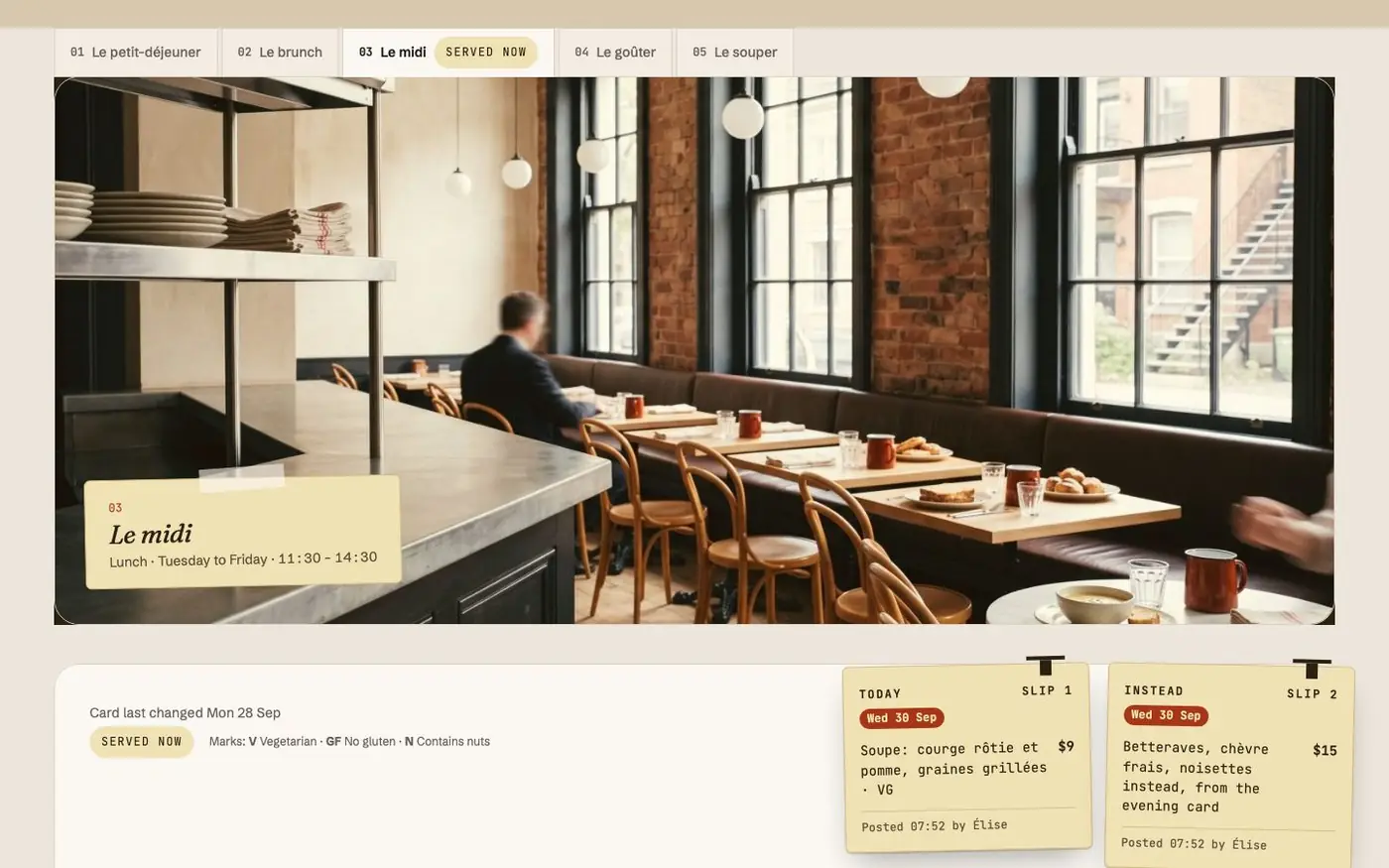
| Hero, the room in the morning · the counter at eight · the room at night | The three homes' first screens: a full-bleed photograph, the heading, Get directions, the open line and the taped slip |
| Today's card, with the day's slips | The card for the service being served beside a photograph of that service |
| Today's changes, the slips at full size | On the red: the heading and a photograph of the tape and slips beside the pass's rail, and the day's slips hanging from the rail, each with its photograph. The rail keeps three places, so the band looks the same with three slips, one or none |
| The day in five services | Five tall photographs, one per service, with its days and hours |
| A dish, told · A bake, told · A souper dish, told | One photograph behind a clipped mask and the story of the dish |
| On the grinder | The bar in two photographs beside the coffees and the bakes |
| The counter this morning | The bakes board: what came out, and when |
| Night band, le souper · Night strip · Goûter band | The evening on the night ground; the afternoon on the red |
| Le souper, the evening card · The carafe list | The bistro home's card and its wine |
| The kitchen, three people | Three portraits with names and roles |
| Book a table, over the room | The booking flow's first step on a docket over a photograph |
| The room, morning to night | A photo mosaic of the room |
| Visit, beside the door · Visit after dark | The address, the way in, today's hours, Get directions |
| From the journal | The three newest posts |
Inner-page sections, named for their page: Menu (index, four plates from the pass, by service, drinks, the drinks poured on the red), Drinks (the bar, hour by hour, the carafes, a closing band), Visit (the week as a card, the ways in, house rules per service, after dark, find us), Book (the bookable services, booking policies, the booking seam, what happens when you press), Groups (three ways, menus, steps, the enquiry, questions), Kitchen (intro, the three people, the day, a closing band), About (story, rooms, years, figures, details, coda), Questions (topics, answers, allergens), Contact (three ways, who reads what), Notices (in short, what the form collects), plus Call to action band, Hero with call to action, Getting here, Hero, the service being served, Header, Footer and Token sheet.
The dietary filter
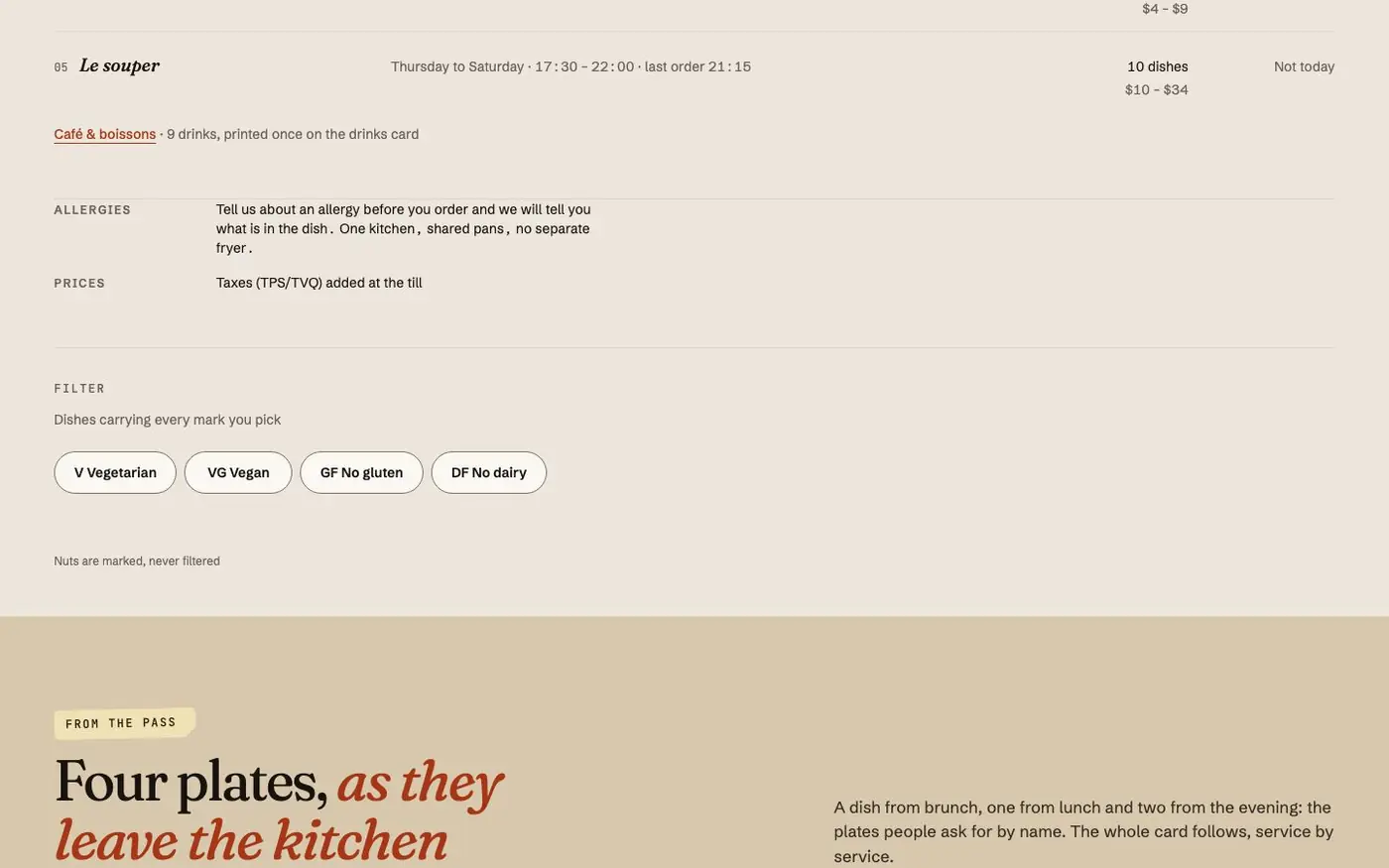
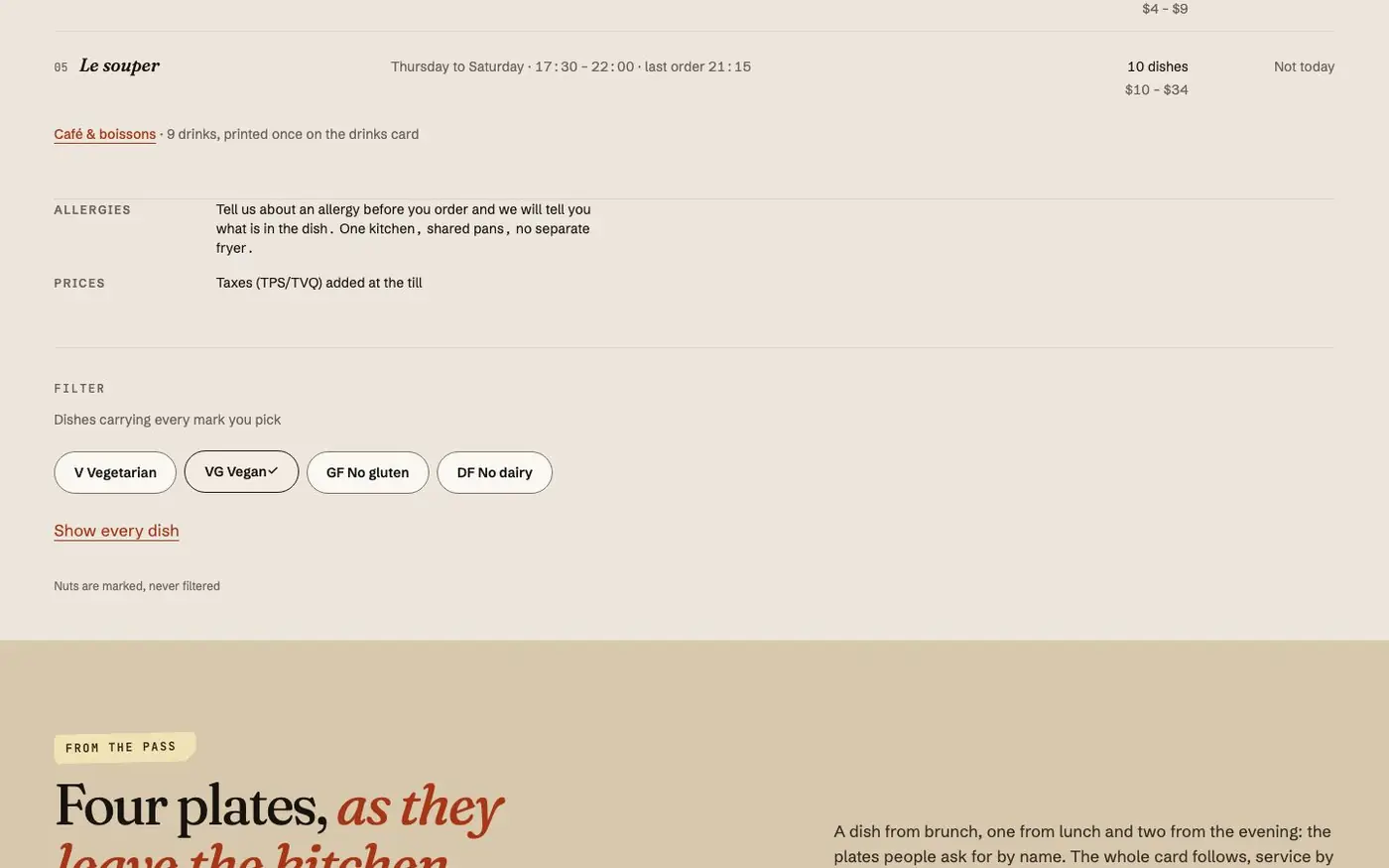
On the card page, the dietary filter is multi-select and cumulative: pick V and GF and you get
the rows that are both. It shows a live count, and rows never leave the page: they are hidden
in place, so nothing reflows under your finger and a reader who wants the whole card again gets it
instantly.
With no JavaScript the control is not shown at all and the whole card is printed, which is the honest fallback.
Motion and reduced motion
Photographs move, a little, and nothing else does unprompted except one dot.
| What | How it moves | When it does not |
|---|---|---|
| Bands and photographs rise into place as they enter the viewport | A fade and a short rise, finished within the first part of the element's entry, so nothing is still fading while it is being read | Reduced motion; a browser without scroll-driven animations; print |
| Full-bleed photographs drift against the scroll: the heroes, the night band, the booking band, the room | At most 8% of travel, tied to the scroll position | The same three cases |
| Photographs answer the pointer | A slow zoom to 1.04 inside their own clipped frame; on the room's mosaic the stamp lifts with it | Reduced motion. A touch screen has no hover, and nothing is hidden behind it |
| A taped slip straightens under the pointer, and a clipped slip settles onto its card once on load | 4px of travel | Reduced motion |
| The open dot | A soft ring every 2.8 seconds, beside the sentence that says the same thing in words | Reduced motion |
| Controls | A button lifts a pixel under the pointer and settles to 0.985 on the press; a disclosure opens to its height | Reduced motion: the state changes, the travel does not |
How it is built, because it decides what you can rely on:
- CSS only. No script and no library drives any of it. The scroll effects sit behind
@supports (animation-timeline: view())andprefers-reduced-motion: no-preference. - Nothing is ever left at zero opacity. Each keyframe states only where an element comes from, so its ordinary rendering is the destination. A browser without support, a reader who asked for less motion, a print sheet and a screenshot all get the finished page.
- Under
prefers-reduced-motion: reduceevery reveal is already in place, nothing drifts or zooms, the dot holds still, and each transition resolves to its destination state. - One curve and a handful of durations, all tokens in
theme.jsonundersettings.custom.motion(250ms for a control up to 750ms for a band arriving). Retuning the whole theme's pace is editing those values in a child theme. - There is no slider, no carousel, no video hero, no page-transition loader, and the mobile panel has no entrance.
To give a block of your own the same behaviour, add a class in the block's Advanced › Additional
CSS class(es): tat-rise to rise on entry, tat-zoom on an Image for the hover zoom, tat-drift
on a full-bleed Cover or Image for the drift.
With the plugin switched off
The theme must look close to its demo with no plugin active, and it does, by design rather than by luck. Three things hold it up.
1. The home bands carry their own typed stand-ins. The bands that read your records when the plugin is active (the hero slip, today's changes, the served card, today's hours, each service's hours, the day strip) show the theme's own typed version when it is not. Those stand-ins name no weekday and no date. See what is static and what comes from the plugin.
2. A plugin block on a page is drawn by the theme's static twin. A page built with the
companion plugin holds the plugin's blocks (table-and-type-core/menu-card, hours-week,
booking-policy and the rest). With the plugin inactive WordPress would print nothing where each
of them stood, so the theme renders inc/twins/<block>.php instead: the same reef-* vocabulary,
printed from one fixed record of the Mireille demo (inc/twins.php). The mechanism is
table_and_type_render_module_block_twin() in functions.php; it fires only for a block the
plugin is not there to register, so with the plugin active the twins never run. A child theme
replaces a twin by shipping a file of the same name.
3. A plugin pattern you inserted falls back to the theme's pattern of the same section.
What a twin is, and is not:
| Piece | With the plugin off |
|---|---|
The card on /menu/: the five services, the index, the drinks |
All printed, stacked, with the theme's stand-in plates; the tabs are anchors |
| The dietary filter and the dish count | Omitted: a control without its script is a dead control |
| Hours, the terrace row, arrival and access facts, the address, the coordinates | Static, from the same record |
| The booking policy, the seam, the takeaway seam, the booking line | Static |
| The enquiry form | A write-to-us address and the privacy line; nothing to receive a form |
| The privacy notice's fields, who is responsible, the five answers | Static |
| The header's open status, the light/dark control | Absent: the theme follows the operating system's scheme |
| The footer's week, address, stamp and tax note | The typed lines the footer part holds |
What needs the plugin: the served-now derivation and "Open until", the filter, slips that appear and expire on their dates, today's marker, the day strip, the enquiry form, the JSON-LD, the abilities. A site without the plugin looks like the demo and stops being told the time.
How a cached page still knows what is being served
A page built once and served to everybody cannot claim an hour. So every band that depends on the clock is rendered in its clock-free state (every service with its days and times, today's candidate slips, the week as a sentence) and the hour is re-derived in the visitor's own browser, in your site's timezone, so a reader in Paris asking what Montréal is serving gets Montréal.
| Band | What the page carries | What the script settles |
|---|---|---|
The menu card, on the home and on /menu/ |
The day's schedule and the window of every slip printed | Which marker shows, which sheets are up, which rows are struck |
| The hero slip and Today's changes | Today's candidate slips and their windows | Which sheets are live now; the quiet sentence when none is |
| The open line, in the header and the hero | The weekly sentence | "Open until …", read from your site once a minute, never from a cached page |
That clock-free state is also what a visitor with no JavaScript sees, what a crawler indexes, and
what the /404 page shows. It is a real answer rather than a spinner.
What the browser settles is deliberately small. It does not re-fetch the dishes or swap the card for a different service: a half-updated card is worse than a card that says plainly which service it is. A slip posted after a page was cached appears when the cache is refreshed, so make sure your page cache purges when content is published.